Download Brimlight for Mac
Download Brimlight for Mac and your menu bar stops being a gray strip before your coffee cools. It's free, it's one file, and it installs in under a minute.
System requirements
- macOS: 14 Sonoma or newer, so Sonoma, Sequoia and Tahoe.
- Chip: Intel or Apple Silicon. One universal app, no "which version do I need" quiz.
- Mac: any MacBook, with or without a notch, iMac, Mac mini or Mac Studio; one display or several.
- Signed and notarized by Apple: Apple checked this exact build for malware before it reached you.
- Price: free, and the free version never expires. Pro is an optional one-time purchase: $6.99 for 1 Mac or $9.99 for 2 Macs.
- Privacy: no account, no tracking, no Screen Recording permission.
Install in four steps
- Download the .dmg with the button above. Your browser saves it to Downloads.
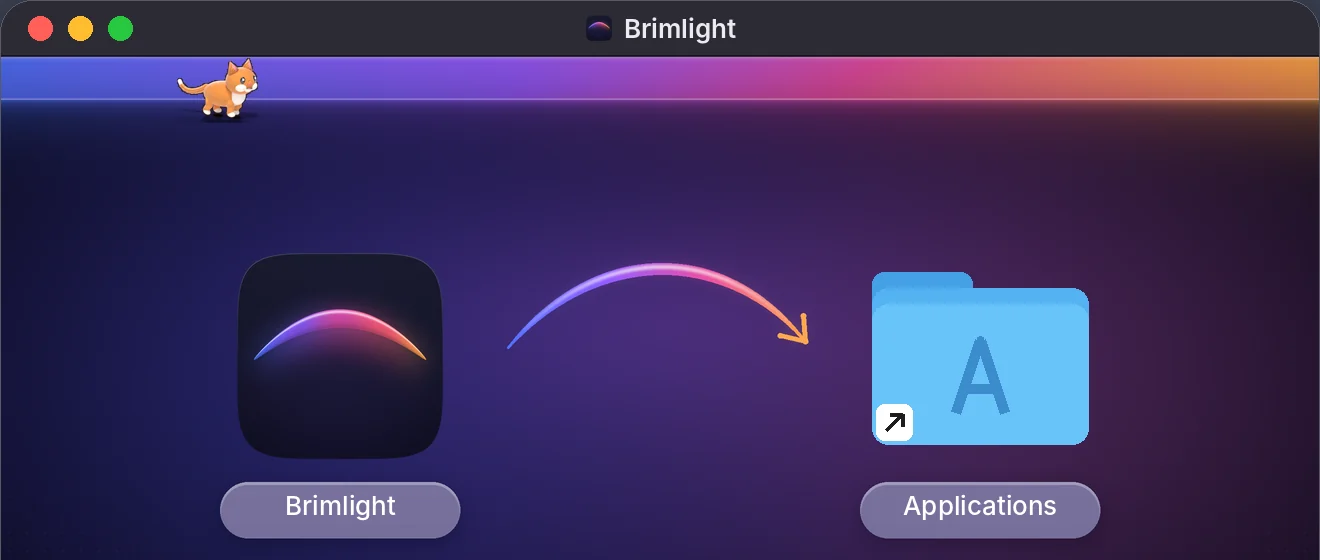
- Open it. A window shows the Brimlight icon, an arrow and your Applications folder. The cat on top is there for moral support.
- Drag Brimlight onto Applications. Then eject the disk image (⏏ in the Finder sidebar) and delete the .dmg if you like a tidy Downloads folder.
- Open Brimlight from Applications, Launchpad or Spotlight (⌘ Space, type "Brimlight"). The first time, macOS asks whether you're sure you want to open an app downloaded from the Internet. Click Open.
That's the whole install. Brimlight puts nothing else on your Mac: no system extensions, no background services that keep running after you quit.
First launch
A short welcome opens on its own. Pick a look for the bar, pick a pet (the 3D cat is free), and decide whether Brimlight should Open at login. The last screen also has a switch for New Year mode; in December and early January it's already on.
Brimlight is a menu bar app, so there's no Dock icon. It lives as a small icon at the top of your screen:
- Click the icon (or press ⌃⌥⌘P) to open the panel: themes, the pet, music mode, decorations.
- Right-click the icon for Settings, Write to the Developer and Quit Brimlight.
Permissions: one, and it's optional
Brimlight works right away without asking for anything. There is one optional switch, Accessibility. With it, the glass islands hug your app menus to the pixel, your pet and your text never step onto a menu, and every notification in a stack gets its own flash. Without it, menu edges are a close estimate and everything else works the same.
To turn it on, open Brimlight Settings, find Accessibility (optional) and click Allow…. macOS opens Privacy & Security › Accessibility, where you switch Brimlight on.
If you use music mode, macOS may ask once whether Brimlight can control Music or Spotify. That's for the play, pause and skip buttons. Say no and the equalizer still dances.
Brimlight never asks for Screen Recording, never uses the microphone and doesn't read your files.
If macOS won't open it
- "Brimlight" is damaged and can't be opened. The download was cut short or the file changed on the way. Move it to the Trash and download it again from this page, never from a mirror site.
- "Brimlight" Not Opened, or the Mac can't verify it. Click Done, open System Settings › Privacy & Security, scroll down and click Open Anyway next to the line about Brimlight. You only do this once.
- "You can't use this version of the application". Your Mac runs macOS 13 Ventura or older. Brimlight needs macOS 14 Sonoma or newer.
- It opened, but you can't see it. Look in the menu bar, not the Dock. On a MacBook with a notch, a crowded menu bar can hide icons behind the notch; quit a menu bar app or two and it reappears.
Update or remove Brimlight
To update, download the latest .dmg from this page and drag Brimlight into Applications again, replacing the old copy. Your settings stay.
To remove it:
- Right-click the Brimlight icon and choose Quit Brimlight.
- Drag Brimlight from Applications to the Trash.
- Optional: if you turned on Accessibility or Open at login, remove Brimlight from System Settings › Privacy & Security › Accessibility and from System Settings › General › Login Items.
That's it. There's no uninstaller to download because there's nothing hidden to uninstall.
Free and Pro
| Free | Pro | |
|---|---|---|
| Price | $0, never expires | $6.99 for 1 Mac or $9.99 for 2 Macs, one-time |
| Pets | the 3D cat with its toys | + capybara and duck family |
| Themes | 6 | all 39 and every future one |
| Music mode | one equalizer, one dance | all 6 equalizers, every dance |
| Decorations | New Year mode + 2 decorations | every decoration |
Readable menus, notch support and several displays are always free. Pro comes with a 30-day money-back guarantee (refund policy). See everything Pro adds
FAQ
Is Brimlight safe to download?
Yes. It's signed with an Apple Developer ID and notarized by Apple, needs no account and collects nothing about you. See the privacy policy.
Does Brimlight work on Intel Macs?
Yes. The same download runs natively on Intel and Apple Silicon Macs with macOS 14 Sonoma or newer.
Is Brimlight on the Mac App Store?
No. An independent developer sells it directly from this site: you download it here, and Pro is a one-time purchase on getbrimlight.com.
Do I need an account?
No account, no sign-up, no email. Download, drag, open.