Christmas lights and snow for your Mac menu bar
Brimlight hangs Christmas lights and snow on your Mac menu bar with a single switch. A garland twinkles under the bar, snow falls and slowly piles into a drift, your pet puts on a Santa hat, and at midnight on January 1 the bar sets off fireworks. New Year mode is free, and it packs itself away when the holidays are over.

New Year mode: one switch, the whole holiday
Open the Brimlight panel, go to decorations and flip New Year mode:
- A garland hangs under your menu bar and twinkles bulb by bulb. If you've already picked another decoration, it stays.
- Snow falls inside the bar and settles into a drift that grows the longer the mode is on.
- A Santa hat on your pet: the cat, the capybara, the duck and every single duckling. The duck's door gets a cap of snow too.
- Fireworks at midnight on January 1, for two and a half minutes, right in your menu bar. They need New Year mode on and Brimlight running; your Mac takes care of the countdown.
- A fireworks button for any other moment: 12 seconds of fireworks, and a second click stops them.
It switches itself off on January 15, because a Santa hat in March is a cry for help. If you turn it on again after that, Brimlight assumes you mean it and leaves it alone. In December and early January, the welcome screen for new users has it switched on already.
Snow and fireworks stay inside the menu bar strip: they never fall over your windows, never cover a menu and never get in the way of a click.
Christmas decorations for the menu bar
Decorations hang just below the menu bar and work with any theme, any season. Each one is rendered in 3D, with glass that catches highlights and filaments that glow, and each one moves on its own:
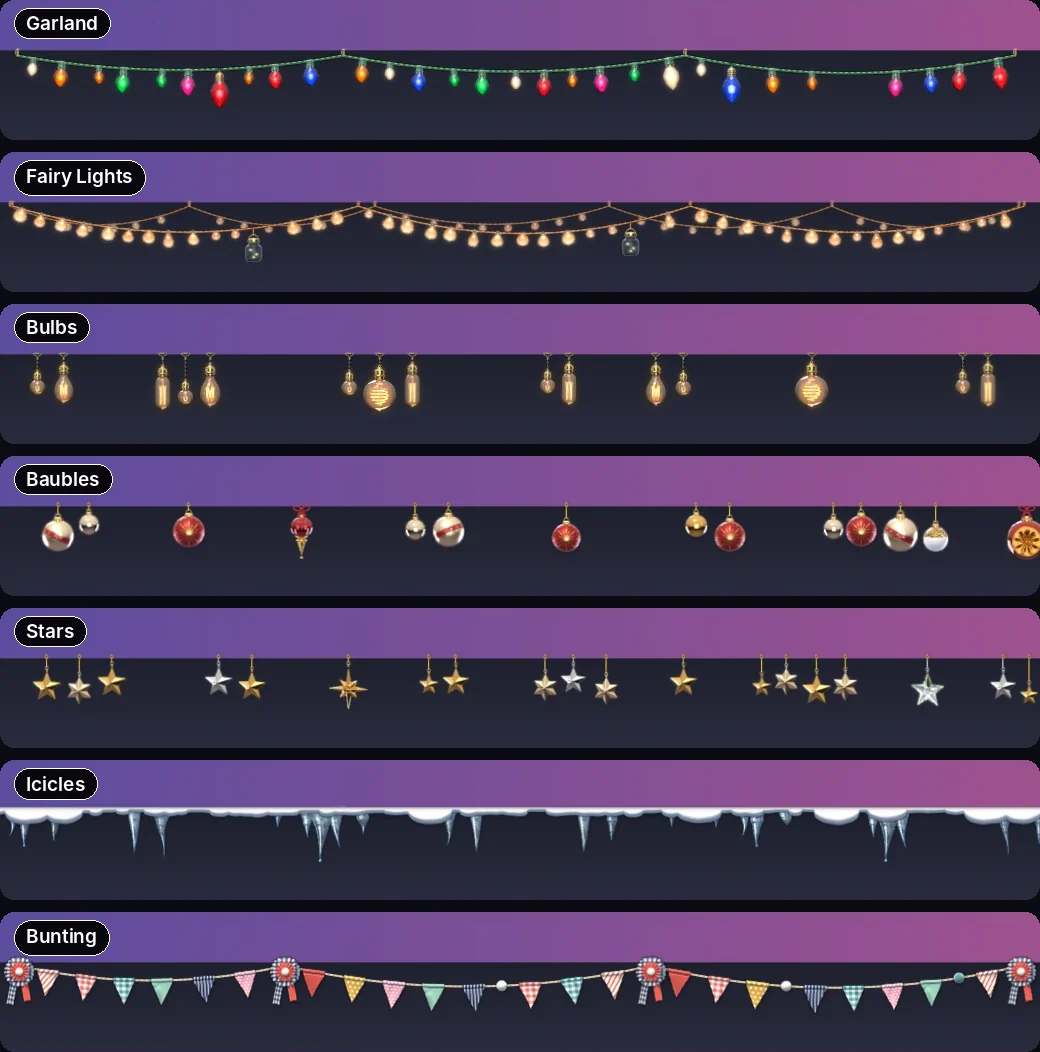
- Garland: colorful glass bulbs with waves of light and the occasional game of chase.
- Fairy Lights: warm LEDs on copper wire with a wave of light running along.
- Bulbs: Edison filament bulbs on wires. The filament flickers, the light breathes, the bulbs sway.
- Baubles: glass and mirror baubles on strings that sway and turn.
- Stars: faceted golden stars on threads that spin and catch the light.
- Icicles: icicles under a cap of snow. A glint slides down and a drop falls now and then.
- Bunting: fabric flags on a string, fluttering in the wind.
For the rest of the year there's a glowing Neon tube, a Sakura branch shedding petals and an autumn branch of falling Leaves.
Write it across the bar in neon
Add your own line to the menu bar, up to 48 characters. "Happy holidays!" fits with room to spare. Pick one of seven styles: Neon, Rainbow, Chrome, Retro, Meme, Pixels or Handwritten. The neon one flickers like an old shop sign. Your pet walks over to read the text: write "party 🎉" and it throws confetti and dances.
A snowy theme to go with it
The New Year's Eve theme is a snowy pixel village with lit windows, smoking chimneys and a Christmas tree; on a light wallpaper it becomes Winter Day. Put a garland under it and you have a whole Christmas card along the top of your screen. More looks are in the theme gallery, and if you want the bar to dance to your holiday playlist, see music mode.
Free and Pro
| Free | Pro | |
|---|---|---|
| New Year mode: garland, snow, Santa hat, fireworks | yes | yes |
| Decorations | 2 | every decoration and holiday pack |
| Text on the bar | one style | all 7 styles and letter games |
| Pets in Santa hats | the cat | the cat, the capybara and the duck family |
| Price | $0, never expires | $6.99 for 1 Mac or $9.99 for 2 Macs, one-time |
Download free Install guide Meet the pets Get Pro
FAQ
How do I put Christmas lights on my Mac menu bar?
Install Brimlight, open its panel and turn on New Year mode. A twinkling garland appears under the menu bar right away, together with snow and a Santa hat on your pet. It's free.
Is there snow for the Mac screen that doesn't get in the way?
Brimlight's snow falls only inside the menu bar and piles into a small drift there. It never covers your windows or blocks a click.
Will the fireworks go off at midnight on their own?
Yes, at midnight on January 1, as long as New Year mode is on and Brimlight is running. You can also launch 12 seconds of fireworks with a button whenever you like.
Does New Year mode stay on forever?
No. It turns itself off on January 15. If you switch it back on after that, it stays on until you turn it off.
Can I use the decorations outside of Christmas?
Yes. Decorations don't depend on New Year mode or on the theme, so fairy lights or bunting can stay up all year. No judgment.