A menu bar music visualizer for Mac
Brimlight is a menu bar music visualizer for Mac. Press play in Apple Music, Spotify or a browser tab, and the strip at the top of your screen turns into an equalizer, while your pet takes the empty part of the bar as its dance floor. Pause, and everything takes a breath with you.
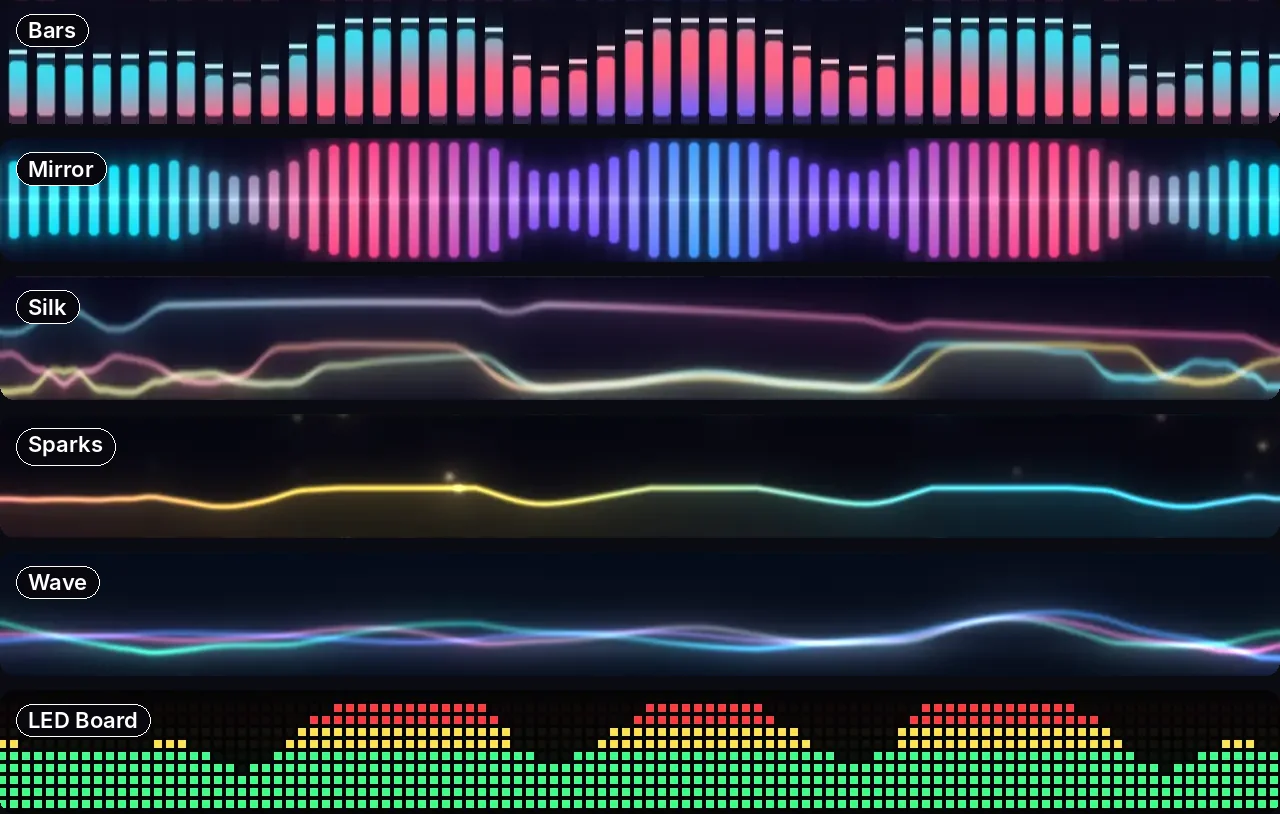
Six equalizers
Each one comes with its own hand-picked colors:
- Bars: classic equalizer bars with little peak caps floating above them.
- Mirror: bars mirrored around the middle line, cyan melting into pink and violet.
- Silk: silky ribbons of color rippling across the bar.
- Sparks: one bright line, with sparks drifting off it like embers.
- Wave: a soft, glowing wave. The one for lo-fi and rainy days.
- LED Board: green dots with yellow and red tops, straight from a 1990s stereo.
On a MacBook with a notch, the equalizer politely parts around it, so nothing is lost behind the camera. The music equalizers also have daytime looks, like every Brimlight theme, so black menu text stays readable on a light wallpaper.
Works with whatever you play
Brimlight follows what's playing on your Mac through the system's Now Playing — the same information macOS shows in Control Center. That covers Apple Music, Spotify and the players in your browser, YouTube included. No plugins, no extensions, nothing to set up in the player.
The honest bit: how it finds the beat
Brimlight never listens to your audio. Capturing your Mac's sound would need a recording permission, and a menu bar decoration has no business asking for that. Instead, Brimlight knows what is playing and when: each track gets its own tempo (somewhere between 92 and 128 beats per minute) and its own pattern, worked out from the track's title and artist. Play — it dances. Pause — it almost freezes. Next track — a new groove. So it's a mood light that's in on the vibe, not a lab-grade spectrum analyzer. Your bar won't know the bass drop is coming, but it will absolutely be dancing when it lands.
Your pet hits the dance floor
The moment music starts, your pet starts dancing, and keeps picking new moves while the music plays:
- Cat: disco, moonwalk, headbang, twirl and groove.
- Capybara: vibe, a deadpan spin, groove, and the lowrider: it drives in with its tiny car and bounces it on hydraulics.
- Duck family: the chicken dance, head bob, twist and groove, ducklings included.
Write "music" or "dance" in your text on the bar, and the pet treats it as a request.

Play, pause, skip
The Brimlight panel shows what's playing — track, artist and cover — with play/pause and skip buttons, so you can change the song without leaving what you're doing. To show the cover, Brimlight may look the track up in Apple's public iTunes catalog by artist and title; nothing else about your music leaves your Mac.
How to turn it on
Open the Brimlight panel and switch on Equalizer with music. From then on the equalizer appears only while something is playing; about 20 seconds after the music stops, your bar goes back to the theme you had. Pick an ordinary theme and music mode switches off. Shuffle switches between equalizers instead of themes.
Free and Pro
| Free | Pro | |
|---|---|---|
| Equalizers | one | all 6 |
| Dances | one | every dance of every pet |
| Pets | the cat | the cat, the capybara and the duck family |
| Price | $0, never expires | $6.99 for 1 Mac or $9.99 for 2 Macs, one-time |
Download free Install guide Get Pro
FAQ
Is there a music visualizer for the Mac menu bar?
Yes — Brimlight turns the whole menu bar into an equalizer while music plays and goes back to your theme when it stops. It works on any Mac with macOS 14 Sonoma or newer.
Does it work with Spotify?
Yes. Brimlight works with Spotify, Apple Music and players in your browser, including YouTube.
Does Brimlight record or listen to my audio?
No. There's no microphone access and no audio or screen recording. Brimlight only reads what's playing (track, artist, play or pause) and gives each track its own tempo and pattern.
Why does macOS ask whether Brimlight can control Music or Spotify?
That one-time question covers the play, pause and skip buttons and the cover art for those two apps. Say no and the equalizer still dances.
Will a music visualizer drain my battery?
Brimlight draws on the graphics chip with Metal and uses about 4–5% of the processor on a 2019 Intel MacBook Pro. On battery it draws fewer frames, and in Low Power Mode it pauses.
Can I keep my theme and only see the equalizer while music plays?
Yes. That's exactly how music mode works: the equalizer shows up while something plays and your theme comes back about 20 seconds after it stops.