Make your MacBook notch actually useful
The notch is a black bite out of the top of your screen. Brimlight gives it a job: rest the cursor on it and a small card slides out from under it, then hides again when you move away.
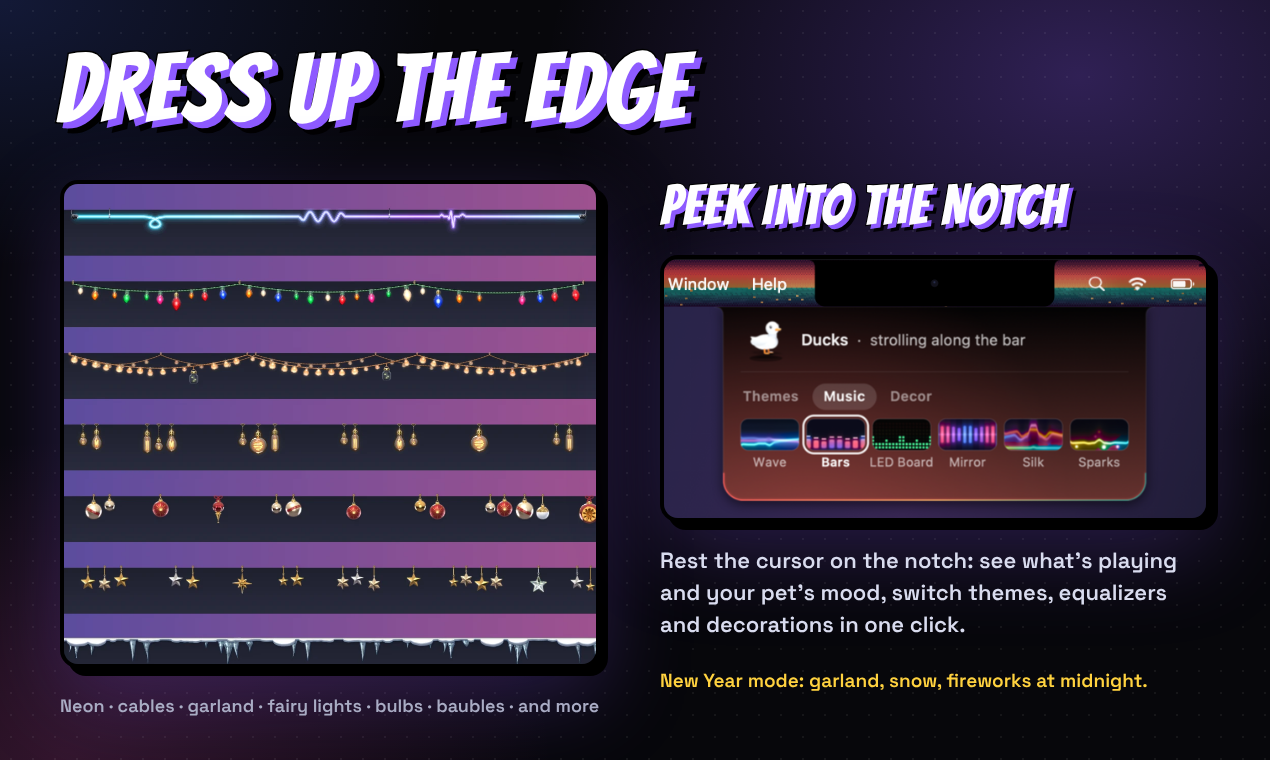
What's in the notch card
- Now playing: track, artist, play/pause, previous and next, and a progress bar with the time.
- Pet the cat: one button, and the 3D cat on your menu bar meows with a little heart.
- Themes in one click: your recent menu bar themes, plus tabs for music and decorations.
- It stays out of the way: it opens only when the cursor rests on the notch, not when you fly past it.
Decorations wrap around the notch too: a neon tube or a garland goes neatly around it instead of disappearing behind it. No notch on your Mac? The same card can sit in the middle of the menu bar.
Brimlight vs NotchNook
NotchNook turns the notch into a Dynamic Island with lots of tools. Brimlight treats the notch as part of a living menu bar. Pick by what you want:
| NotchNook | Brimlight | |
|---|---|---|
| Music controls in the notch | yes | yes |
| File tray, calendar, camera mirror | yes | no |
| Animated menu bar themes | no | 41 themes |
| 3D pet in the menu bar | no | cat, capybara, ducks |
| Decorations around the notch | no | yes |
| Price | $25 lifetime or $3/month after a trial | free; Pro is a one-time $6.99 |
If you want a toolbox in the notch, NotchNook is the stronger tool. If you want the whole top of your Mac to feel alive, with the notch as a remote control, that's Brimlight. If another notch app is running, Brimlight notices and lets you choose which one gets the notch.
FAQ
Is the notch card free?
Yes. The notch card and notch support come with the free version. Pro adds all themes, pets and decorations.
Does it work on Macs without a notch?
Yes. Turn on the option to show it in the center of the menu bar, and the same card opens from the middle of the bar.
Does Brimlight need Screen Recording?
No. It never asks for Screen Recording.